> ## Documentation Index
> Fetch the complete documentation index at: https://docs.vh3.ai/llms.txt
> Use this file to discover all available pages before exploring further.
# n8n Node — Coding Agent Reference
> Complete resource, operation, and pattern reference for AI assistants building VH3 AI n8n workflows
# n8n Node — Coding Agent Reference
Attach this document at the start of any AI session where you are building VH3 AI n8n workflows. It covers the node's resources, operations, routing decisions, patterns, and constraints, and works with Claude.ai, Claude Code, Cursor, or any chat session with the file attached.
* Source: [github.com/VH3DIGITAL/n8n-nodes-vh3ai](https://github.com/VH3DIGITAL/n8n-nodes-vh3ai)
* npm: [n8n-nodes-vh3ai](https://www.npmjs.com/package/n8n-nodes-vh3ai)
* Agent prompts: [/agent-kits/n8n-agents](/agent-kits/n8n-agents)
## Connecting your AI assistant to n8n
### The recommended setup: official n8n connector + this document
The **official n8n connector** (developed by n8n GmbH, available in the Claude connector directory) connects Claude to your live n8n instance. On instances running n8n **v2.18.4 or higher**, it exposes the full instance-level MCP — including workflow building, not just execution.
**What it can do** (verified on VH3-managed instances):
| Tool | Purpose |
| --------------------------------------- | ----------------------------------------------------- |
| `get_sdk_reference` | Load the n8n Workflow SDK before writing code |
| `get_suggested_nodes` | Recommended node types for a workflow pattern |
| `search_nodes` / `get_node_types` | Discover nodes and fetch exact parameter schemas |
| `list_credentials` | Find available credentials by name (secrets redacted) |
| `validate_workflow` | Pre-deploy validation of workflow code |
| `create_workflow_from_code` | Compile SDK code and save to your instance |
| `search_workflows` / `execute_workflow` | Find and run existing workflows |
**Setup (Claude.ai) — step by step:**
Switch to **Code** mode in Claude.ai. Your active connectors appear in the input bar at the bottom of the screen.
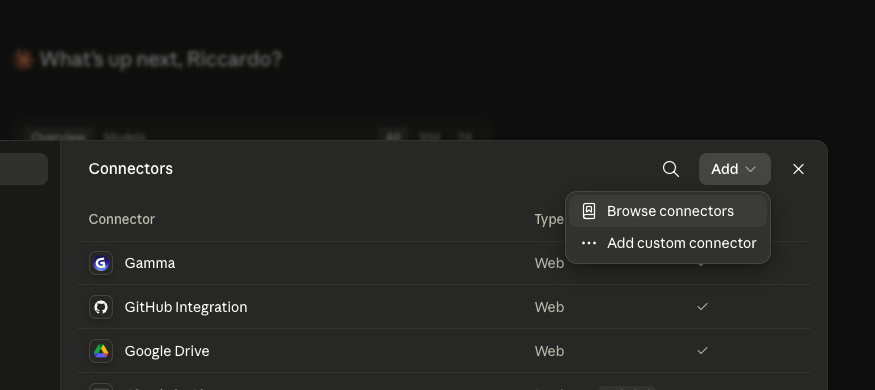
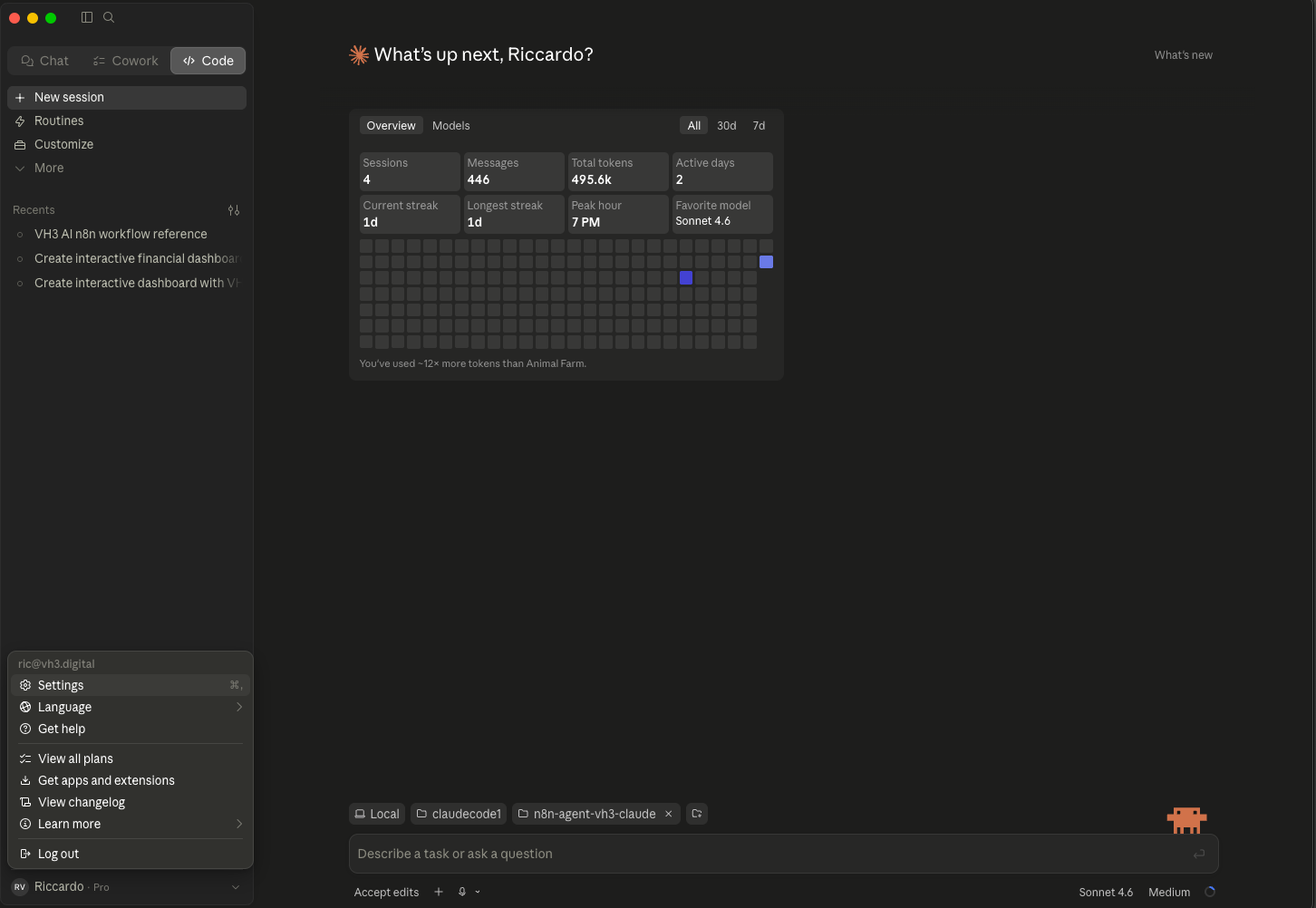 Click on the **Connectors** area, then click **Add → Browse connectors** to open the connector directory.
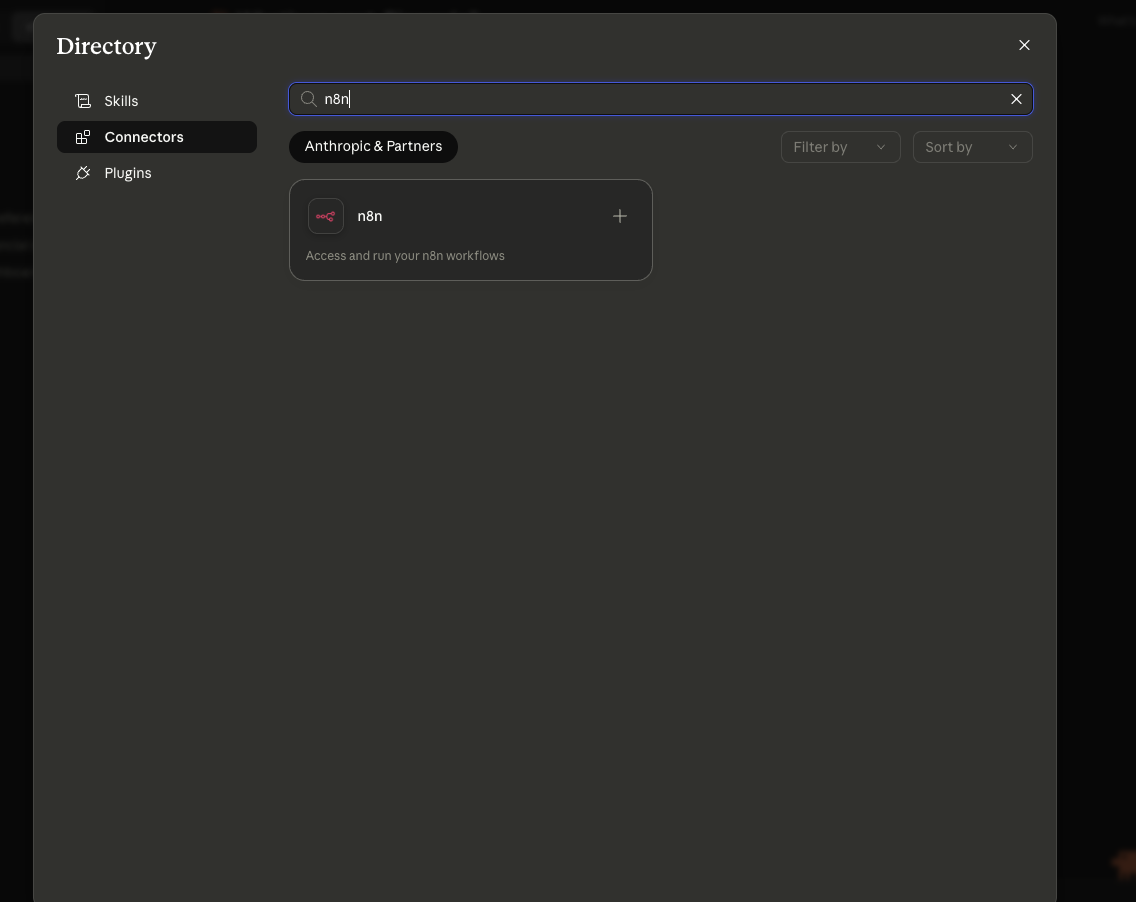
 In the Directory, select **Connectors** and search for **n8n**. The official n8n connector by n8n GmbH will appear.
 Switch to your n8n instance. Click **Settings** in the left sidebar and select **Instance-level MCP** from the menu.
 Toggle Instance-level MCP on, then copy the **Server URL** shown in the Connection details panel. This is the URL you'll paste back into Claude.
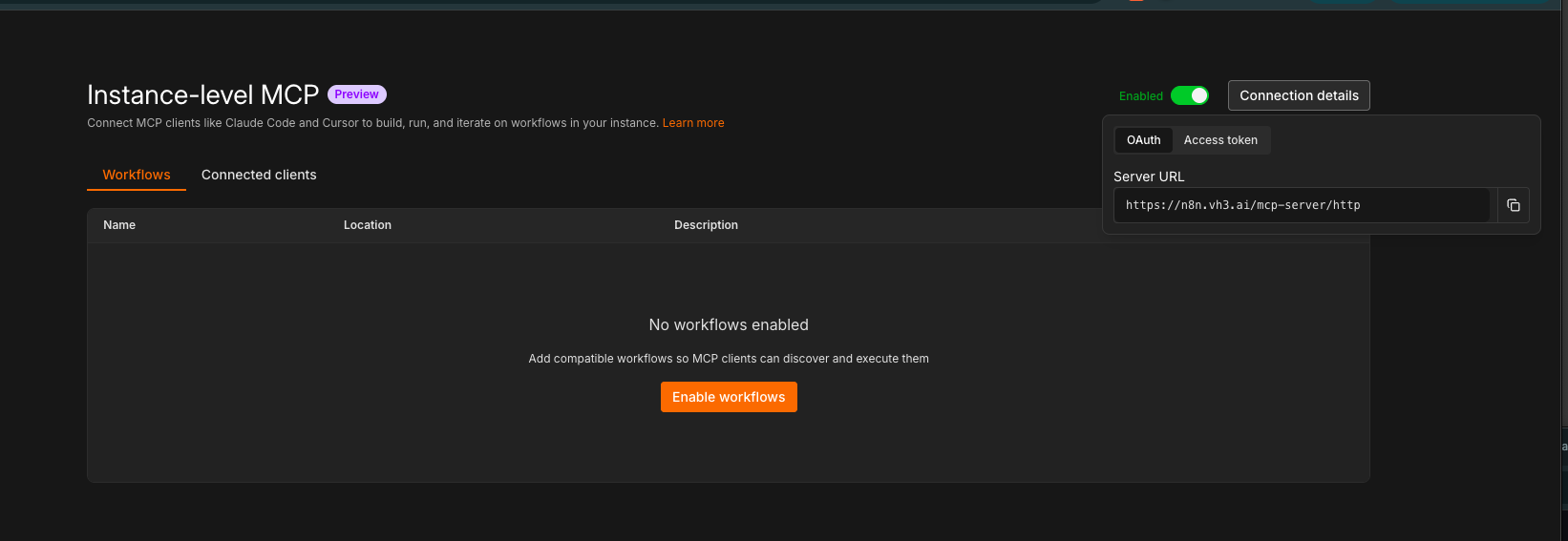 **VH3-managed instances:** Your URL is `https://{your-company}.n8n.vh3.ai/mcp-server/http`. Contact VH3 support if Instance-level MCP is not yet enabled on your instance.
Back in the Claude connector directory, click the n8n connector. When the **Install n8n** dialog appears, paste your Server URL into the field and click **Continue**.
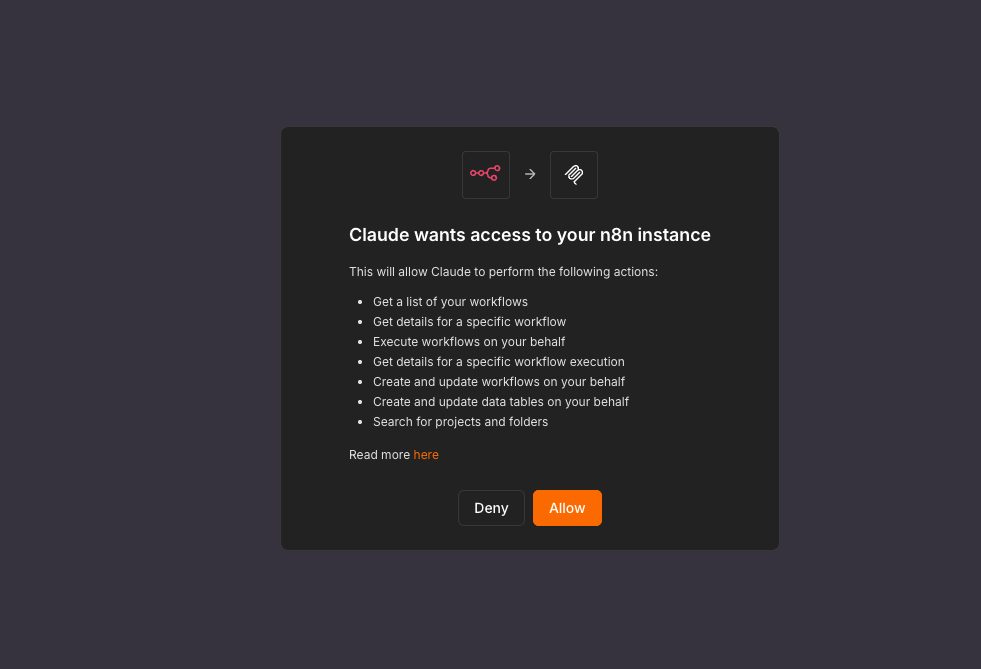
Claude will ask for permission to access your n8n instance. Click **Allow** — this grants Claude the ability to list, execute, create, and update workflows on your behalf.
**VH3-managed instances:** Your URL is `https://{your-company}.n8n.vh3.ai/mcp-server/http`. Contact VH3 support if Instance-level MCP is not yet enabled on your instance.
Back in the Claude connector directory, click the n8n connector. When the **Install n8n** dialog appears, paste your Server URL into the field and click **Continue**.
Claude will ask for permission to access your n8n instance. Click **Allow** — this grants Claude the ability to list, execute, create, and update workflows on your behalf.
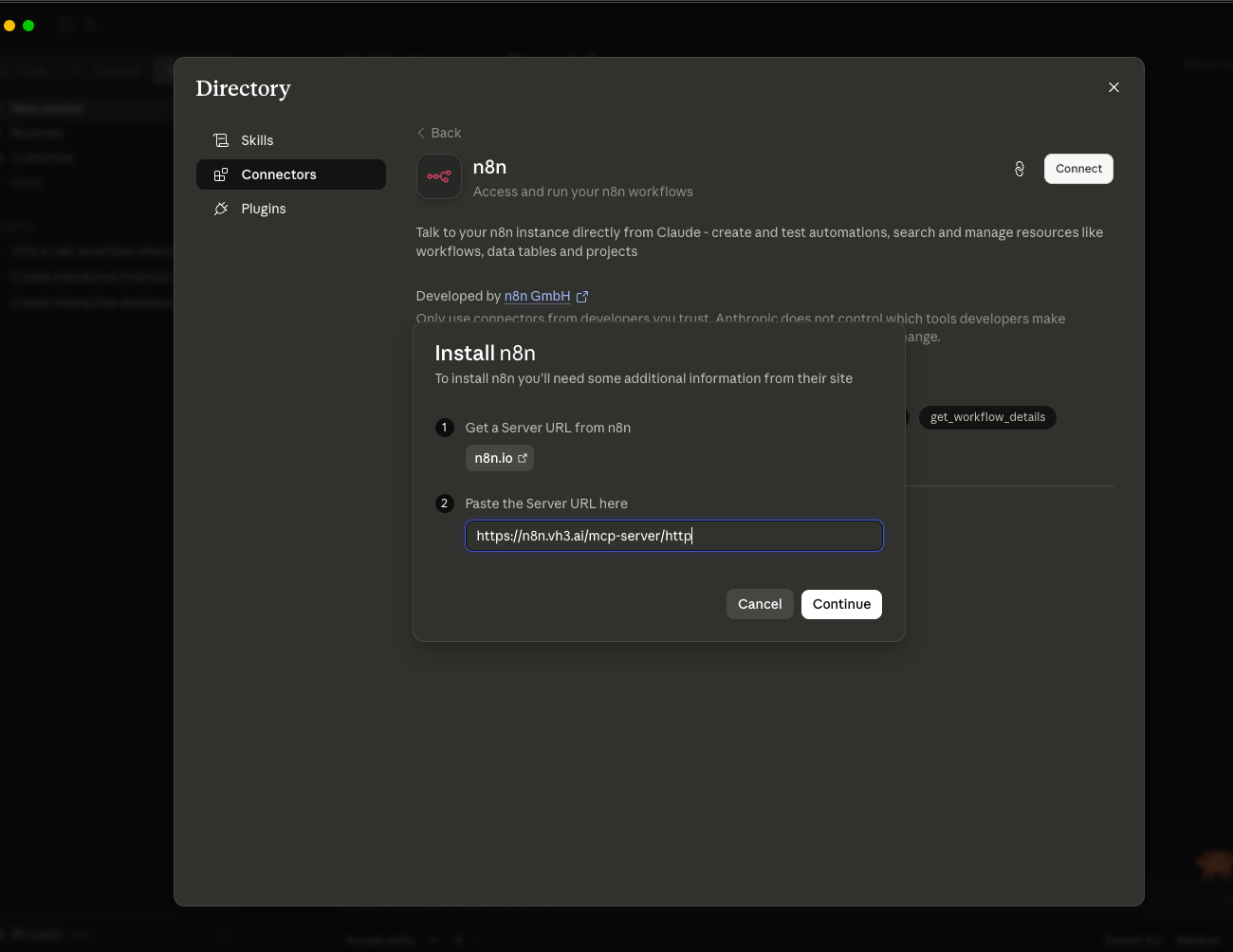 The n8n connector now appears in your directory and is active in the Claude Code input bar. You can now ask Claude to build, validate, and deploy workflows directly on your instance.
 **Setup (Claude Code — CLI):**
```bash theme={null}
claude mcp add --transport http n8n-mcp https:///mcp-server/http
```
Enable instance-level MCP in your n8n instance first: **Settings → Instance-level MCP**. Full tool reference: [n8n MCP tools reference](https://docs.n8n.io/advanced-ai/mcp/mcp_tools_reference/)
**VH3-managed instances:** Your n8n URL is `https://{your-company}.n8n.vh3.ai`. The `n8n-nodes-vh3ai` community node and VH3 credentials are pre-installed. Contact VH3 support if you need your MCP access token or API key.
### This reference document — the VH3 AI layer
The official n8n MCP knows n8n's built-in nodes and the Workflow SDK. It does **not** know the VH3 AI community node — its resources, operations, routing rules, or patterns. Without this document, an AI assistant will not know:
* Which resource and operation to choose for a given question (section 5)
* That `jobFeed` should be preferred over `jobs` for reads (section 3d)
* The correct `timeAxis` for performance vs intake questions (section 4)
* How `ingestEmail` status values route downstream (section 6.8)
* That custom field IDs must be fetched from the job type first (section 10)
* The exact node type name (`n8n-nodes-vh3ai.vh3Ai`) and credential type (`vh3AiApi`)
Attach this document at the start of any session where you are building VH3 AI workflows. Combined with the n8n connector, this is the complete stack.
### Optional: czlonkowski/n8n-mcp (Cursor and offline authoring)
[czlonkowski/n8n-mcp](https://github.com/czlonkowski/n8n-mcp) is a separate community MCP server. It is **not** what the official Claude n8n connector uses, and is **not** required for the build experience described above.
Consider it if you are working in **Cursor** or another editor, want stricter pre-deploy validation, or need offline node schema lookup without a live n8n connection. It uses different tool names (`n8n_create_workflow`, `get_node`, etc.) and requires a one-time install via npx or Docker.
Setup: [github.com/czlonkowski/n8n-mcp](https://github.com/czlonkowski/n8n-mcp)
### Summary
| Layer | What it provides | Required? |
| ------------------------------------------- | ----------------------------------------------------------- | -------------------------------------- |
| Official n8n connector | Build, validate, deploy, and run workflows on your instance | Yes — core setup |
| This document | VH3 AI node: resources, operations, routing, patterns | Yes — VH3 domain knowledge |
| [n8n Agent Prompts](/agent-kits/n8n-agents) | System message for AI Agent node workflows | When building conversational AI agents |
| `czlonkowski/n8n-mcp` | Offline node schema, strict validation, Cursor integration | Optional |
***
## 1. Identity
| Property | Value |
| ------------------ | ------------------------------------------------------------------------- |
| NPM package | `n8n-nodes-vh3ai` |
| Node type name | `vh3Ai` |
| Display name | `VH3 AI` |
| Credential type | `vh3AiApi` |
| `usableAsTool` | `true` — can be dropped directly into an AI Agent node as a tool sub-node |
| n8nNodesApiVersion | `1` |
***
## 2. Credential: `vh3AiApi`
Four fields are stored in the credential. Two are fixed defaults and should not be changed unless VH3 support instructs otherwise.
| Field | Internal name | Required | Default | Notes |
| ------------ | ------------- | ------------- | ---------------------------------------- | ------------------------------------------------------------------------------------ |
| API Key | `apiKey` | Yes | — | Sent as `X-API-KEY` header on every request |
| Company ID | `companyId` | Conditionally | — | Required for single-record operations (e.g. Get Job). Omit for list/feed operations. |
| Base URL | `baseUrl` | Yes | `https://api.vh3connect.io` | BigChange Web Services proxy base |
| FSI Base URL | `fsiBaseUrl` | Yes | `https://api.vh3connect.io/api:kP8T1CK7` | VH3 AI intelligence layer base |
When generating a VH3 AI node block in JSON, reference the credential as:
```json theme={null}
"credentials": {
"vh3AiApi": { "id": "", "name": "" }
}
```
***
## 3. Resource taxonomy
The node exposes **30 resources** split across three internal API layers. This split is invisible in the UI but critical for understanding timeout, latency, and data freshness expectations.
### 3a. BigChange data resources (CRUD)
These map directly to the BigChange field-service platform. Operations are typically fast (\<2 s). The resource values are used in `$parameter["resource"]`.
| Display name | `resource` value | What it covers |
| ------------------------------- | -------------------- | ------------------------------------------------------------------------ |
| Job (BigChange) | `jobs` | CRUD, schedule, start, set result, cancel, manage stock constraints |
| Contact (BigChange) | `contacts` | Companies and sites — create, read, update, delete |
| Resource / Engineer (BigChange) | `resources` | Engineers/technicians and their groups |
| Job Type (BigChange) | `jobTypes` | Job type templates (installation/repair/maintenance schemas) |
| Vehicle (BigChange) | `vehicles` | Fleet vehicles — read/create/update records and groups |
| Worksheet (BigChange) | `worksheets` | Mobile worksheet definitions, questions, and submitted answers |
| Worksheet Group (BigChange) | `worksheetGroups` | Folders that organise worksheet definitions |
| Invoice (BigChange) | `invoices` | Sales invoices and line items |
| Note (BigChange) | `notes` | Notes/tasks/updates on jobs, contacts, and persons |
| Person (BigChange) | `persons` | Individual people attached to a contact (site contacts, consent history) |
| Job Group (BigChange) | `jobGroups` | Linked sets of jobs (multi-visit projects) |
| Stock (BigChange) | `stock` | Product categories, stock details, items, movements, suppliers |
| Reference Data (BigChange) | `referenceData` | Department codes, nominal (accounting) codes |
| Quote (BigChange) | `quotes` | Sales quotes and line items |
| Sales Opportunity (BigChange) | `salesOpportunities` | CRM pipeline — read, edit, line items, probabilities, stages |
| Purchase Order (BigChange) | `purchaseOrders` | Purchase orders and line items |
### 3b. Web Services resources (BigChange driver API)
Thin proxy over the BigChange Web Services layer. Responses use different envelope shapes (`result` array, not `data`).
| Display name | `resource` value | What it covers |
| ------------------------- | ---------------- | --------------------------------------------------- |
| Attachment (Web Services) | `wsAttachments` | Retrieve/list attachments for BigChange entities |
| Report (Web Services) | `wsReports` | Driver/vehicle performance and infringement reports |
| Tracking (Web Services) | `wsTracking` | GPS journeys, live positions, odometer readings |
### 3c. VH3 AI intelligence resources
These call the FSI intelligence layer. They are **slower** (2–25 s depending on operation) and consume LLM tokens for synthesis operations.
| Display name | `resource` value | Latency tier | What it covers |
| ----------------------- | ---------------- | --------------- | ------------------------------------------------------------------ |
| Job Feed (VH3 AI) | `jobFeed` | Fast (\< 3 s) | Enriched, paginated job feed with aggregation and analytics |
| Search (VH3 AI) | `search` | Fast (\< 3 s) | Semantic and outcome search, autocomplete, customer knowledge base |
| Sentinel (VH3 AI) | `sentinel` | Medium (3–8 s) | Proactive monitoring checks |
| Pulse (VH3 AI) | `pulse` | Fast | Cached business-health dashboard snapshot |
| Email (VH3 AI) | `email` | Fast–Medium | Email triage: classify, ingest, batch classify, list rules |
| Briefing (VH3 AI) | `briefing` | Medium (5–10 s) | Pre-visit intelligence briefing + call script for an engineer |
| Case (VH3 AI) | `cases` | Fast | Case management: create, update, transition, comment, link items |
| Connie (VH3 AI) | `connie` | Medium (5–15 s) | Conversational AI assistant: chat, sessions, history search |
| Report (VH3 AI) | `reports` | Slow (10–25 s) | Operational reports (daily, weekly, monthly) with narrative |
| Investigate (VH3 AI) | `investigate` | Slow (10–25 s) | Multi-step hybrid vector + graph investigation |
| Account Report (VH3 AI) | `accountReport` | Slow (10–25 s) | Monthly account review across full parent-child hierarchy |
| Intelligence (VH3 AI) | `intelligence` | Medium | Job type profiling — list, get, generate intelligence profiles |
| Weather (VH3 AI) | `weather` | Fast | Weather for jobs, sites, forecasts, historical lookups |
| User (VH3 AI) | `users` | Fast | User management — list, invite, update role, delete |
### 3d. FSI-first principle
**When both a BigChange resource and a VH3 AI intelligence resource can answer the same question, prefer the intelligence layer.**
The FSI layer ingests and enriches all job data continuously. For read operations — job feeds, aggregations, search, analysis, monitoring — it is faster (often cached), returns richer data, and avoids unnecessary load on the BigChange API.
| Question | Prefer | Reason |
| ------------------------ | ------------------------------------------ | -------------------------------------- |
| List or search jobs | `jobFeed` (VH3 AI) over `jobs` (BigChange) | Enriched, cached, supports aggregation |
| What needs attention? | `sentinel` (VH3 AI) | Pre-computed, no extra API calls |
| Business health snapshot | `pulse` (VH3 AI) | Cached dashboard, single call |
| Find a customer by name | `search → autocomplete` (VH3 AI) | Fuzzy match, no ID required |
| Historical job analysis | `jobFeed → aggregateJobs` (VH3 AI) | Built-in metrics, period comparison |
The intelligence layer does not write to BigChange. It is read-only for operational intelligence. To create or modify records — jobs, contacts, invoices, notes — use the BigChange CRUD resources (section 3a).
***
## 4. The time axis — critical for data quality
Several Job Feed and Aggregate Jobs operations accept a `dateField` or `timeAxis` parameter. Choosing the wrong axis produces misleading results.
### Available timestamp fields
| Value | What it represents | Use when... |
| ---------------- | -------------------------------------------- | ------------------------------------------------------- |
| `actualStartAt` | When the engineer physically began the job | Measuring real performance, throughput, productivity |
| `actualEndAt` | When the engineer finished | Measuring duration, closure rates, end-of-day analysis |
| `createdAt` | When the job record was created in BigChange | Measuring intake volume, demand pipeline analysis |
| `plannedStartAt` | When the job was scheduled to start | Measuring scheduling accuracy, schedule adherence drift |
| `plannedEndAt` | When the job was scheduled to finish | — |
| `scheduledAt` | When the scheduling decision was made | — |
### Decision rules
**Default to `actualStartAt`** for any performance or workload question. It reflects real field activity and excludes jobs that were planned but never worked.
```
Question type → Recommended time axis
─────────────────────────────────── ────────────────────────
How many jobs did we complete? actualStartAt / actualEndAt
What's our first-visit fix rate? actualStartAt
How many jobs came in this week? createdAt
Are engineers on time? plannedStartAt → actualStartAt delta
What's in the schedule for today? plannedStartAt
How long do jobs take? actualStartAt → actualEndAt delta
```
`createdAt` includes jobs that were planned but never attended. Do not use it for performance analysis unless the user is explicitly asking about intake volume or pipeline.
**Partial periods**: When the current period (e.g. `this_week`) is still in progress, say so before drawing conclusions. The `compareTo` parameter (`previous_period`, `same_period_last_week`, `same_period_last_month`) handles apples-to-apples comparison automatically — prefer it over inventing date ranges.
***
## 5. Routing guide — which resource and operation to use
Use this table when the user's intent is expressed in natural language, to select the right VH3 AI node operation.
| User intent | Resource | Operation |
| ---------------------------------------------------- | --------------- | -------------------------------------------------------------- |
| "How many jobs did we complete last week?" | `jobFeed` | `aggregateJobs` — metric: `job_count`, timeAxis: `actualEndAt` |
| "What's our first-visit fix rate?" | `jobFeed` | `aggregateJobs` — metric: `first_visit_fix_rate` |
| "Show me jobs for customer X" | `jobFeed` | `listJobFeed` — filter: `contactId` |
| "Show me all jobs for an account including children" | `jobFeed` | `listAccountJobFeed` |
| "Get the detail for job FAB303178" | `jobFeed` | `getEnrichedJob` |
| "Find jobs like this one / similar past work" | `search` | `searchOutcomes` or `searchIntake` |
| "What do we know about this customer?" | `search` | `getSummaryByContact` or `searchSummarySections` |
| "Find a customer / engineer / site" | `search` | `autocomplete` |
| "What needs attention today?" | `sentinel` | `runSentinels` (sentinelId: `all`) |
| "Is there a pattern of problems at a site?" | `sentinel` | `runSentinels` — `new_problem_site` or `site_deterioration` |
| "Why are roofing jobs running late?" | `investigate` | `runInvestigation` |
| "What is causing repeat failures?" | `investigate` | `runInvestigation` |
| "Generate today's start-of-day briefing" | `reports` | `generateReport` — reportType: `start_of_day` |
| "End of week summary" | `reports` | `generateReport` — reportType: `end_of_week` |
| "Monthly account review for client X" | `accountReport` | `generateAccountReport` |
| "Brief the engineer before they visit" | `briefing` | `generateBriefing` |
| "Classify this incoming email" | `email` | `classifyEmail` or `batchClassifyEmail` |
| "Extract job data from this FM portal email" | `email` | `ingestEmail` |
| "What's our current business health?" | `pulse` | `getPulse` |
| "Ask Connie about..." | `connie` | `connieChat` |
| "Create a case for this incident" | `cases` | `createCase` |
| "Create / update a job" | `jobs` | `create` / `update` |
| "Create / update a contact" | `contacts` | `create` / `update` |
| "What's the weather for this job?" | `weather` | `getWeatherForJob` |
| "Create jobs from FM portal emails" | `email` | `ingestEmail` — route downstream on returned `status` field |
***
## 6. Per-resource operation reference
### 6.1 Job Feed (`jobFeed`)
| Operation | Key inputs | Notes |
| -------------------- | ---------------------------------------------------------------------------------------- | ------------------------------------------------------------------------------------------------------------------------------------------------------------------ |
| `listJobFeed` | `status` (multi), `dateField`, `dateFrom`, `dateTo`, `contactId`, `resourceId`, `typeId` | Default `dateField`: `createdAt`. Add `simplify: true` to strip nulls. |
| `listAccountJobFeed` | `contactId` (required — any in hierarchy) | Traverses full parent-child account tree automatically |
| `aggregateJobs` | `metric`, `period`, `timeAxis`, `groupBy`, `compareTo` | Use `compareTo` for period-over-period. `groupBy` options: `status`, `result`, `typeId`, `categoryId`, `resourceId`, `siteKey`, `vertical`, `day`, `week`, `month` |
| `getEnrichedJob` | `jobId` (required), `includeWorksheets` | Returns AI enrichment: vertical, sentiment, key phrases |
**Aggregate metrics**: `job_count`, `completion_rate`, `first_visit_fix_rate`, `avg_start_delta_mins`, `avg_end_delta_mins`.
**Period presets**: `today`, `yesterday`, `this_week`, `last_week`, `this_month`, `last_month`, `last_7_days`, `last_30_days`, `last_90_days`. Override with `startDate`/`endDate` for custom ranges.
### 6.2 Search (`search`)
| Operation | Key inputs | Notes |
| ----------------------- | ------------------------------------------------------------------------------ | ----------------------------------------------------------------------------------------------------------------------------------------------------------------------------------------------------------------- |
| `autocomplete` | `query`, `typeFilter` (multi: `customer`, `engineer`, `job`, `person`, `site`) | Fast fuzzy lookup across all entity types |
| `searchOutcomes` | `queryText`, `contactId`, `resourceId`, `typeId`, `maxAgeMonths` | Semantic search on job diagnostic summaries |
| `searchIntake` | `queryText`, `contactId`, `resourceId`, `typeId` | Semantic search with knowledge graph enrichment |
| `searchIntakeBasic` | `queryText` | Same as above, without graph enrichment (faster) |
| `searchSummarySections` | `query`, `contactId`, `sectionKey` | Search the CustomerSummary knowledge base. Section keys: `customer_overview`, `job_history_patterns`, `operational_performance`, `risk_opportunity`, `systems_equipment`, `communication_summary`, `key_analyses` |
| `getSummaryByContact` | `contactId`, `fullReport` | Retrieves all stored CustomerSummary sections. Set `fullReport: true` for assembled markdown. |
Date filtering on semantic search operations is applied **client-side** after the API responds. Set `maxAgeMonths` to limit result age.
### 6.3 Sentinel (`sentinel`)
| Operation | Key inputs | Notes |
| ---------------------- | ----------------------------- | ------------------------------------------------------------------ |
| `runSentinels` | `sentinelId` (default: `all`) | Returns only triggered alerts. Use `all` for a full check. |
| `getSentinelResults` | — | Returns cached results from the last run (fast, no re-computation) |
| `listSentinelRegistry` | — | Lists all sentinel definitions with thresholds and schedules |
**Available sentinels**: `carryover_accumulation`, `customer_noncomplete_anomaly`, `customer_risk_escalation`, `data_quality_alert`, `engineer_performance_slip`, `fvf_rate_drop`, `new_problem_site`, `repeat_failure_escalation`, `scheduling_accuracy_drift`, `site_deterioration`, `sla_breach_cluster`, `workload_imbalance`.
For scheduled automations, use `getSentinelResults` (cached, instant) rather than `runSentinels` (re-computes) to avoid latency in time-sensitive triggers.
### 6.4 Report (`reports`)
| Operation | Key inputs | Notes |
| -------------------- | ---------------------------------------------------- | ----------------------------------------------------- |
| `generateReport` | `reportType`, `date`, `includeNarrative`, `sections` | Narrative adds 2–5 s. Omit `sections` to include all. |
| `listReportSections` | — | Discover section IDs for selective report generation |
**Report types**: `start_of_day`, `midday`, `close_of_business`, `day_review`, `start_of_week`, `midweek`, `end_of_week`.
Set workflow/node timeout to ≥ 30 s for narrative reports.
### 6.5 Investigate (`investigate`)
| Operation | Key inputs | Notes |
| ------------------ | ------------------------------------------ | --------------------------------------------------------------------------------------------------------- |
| `runInvestigation` | `question` (free text), `maxEvidenceItems` | Multi-step hybrid search across the intelligence layer. Expensive — 10–25 s. Do not use in polling loops. |
### 6.6 Case (`cases`)
| Operation | Notes |
| ------------------ | ------------------------------------------------------------------------------------------------------------------------------------ |
| `createCase` | `title` + `caseType` required. Types: `audit`, `case_study`, `compliance`, `incident`, `investigation`, `project_review` |
| `listCases` | Filter by `status`, `type`, `priority`, `ownerId` |
| `searchCases` | Full-text search across title and description |
| `getCase` | Returns participants, items, latest activity |
| `updateCase` | Patch — only provided fields change |
| `transitionCase` | Lifecycle-validated status changes. Statuses: `draft` → `open` → `in_progress` → `under_review` → `resolved` → `closed` / `archived` |
| `addComment` | Adds to activity timeline |
| `addCaseItem` | Links a job, customer, site, engineer, job group, note, or document |
| `listCasesForItem` | Reverse lookup — find all cases referencing a specific record |
### 6.7 Connie (`connie`)
| Operation | Key inputs | Notes |
| -------------------------- | -------------------------------------------------------- | ------------------------------------------------------------------------------------------------------------------ |
| `connieChat` | `message`, `sessionId` (optional), `contactId`, `userId` | Pass `sessionId` to continue an existing conversation. Set `experimentalMode: true` for the experimental pipeline. |
| `listSessions` | `userId`, `contactId` | — |
| `connieGetSessionMessages` | `sessionId` | — |
| `connieSearchHistory` | `query`, `userId`, `contactId` | — |
For AI Agent workflows, use `connieChat` with `sessionKey`-scoped `sessionId` so follow-up messages retain context.
### 6.8 Email (`email`)
| Operation | Notes |
| ---------------------- | ----------------------------------------------------------------------------------------------------------------------------------------- |
| `classifyEmail` | `subject` + `emailBody` + `senderAddress` required. Supports attachment via URL or binary data. |
| `batchClassifyEmail` | JSON array of up to 50 email objects. Portal/pre-filter hits are instant; novel emails consume LLM tokens. |
| `ingestEmail` | Extracts structured job data from FM portal emails. Returns resolved entities and a `status` field. Always switch on `status` downstream. |
| `listTriageCategories` | Returns active categories with priority, destination, and prompt rules. |
| `listTaxonomyRules` | Filter by `phase`: `pre_classify` (noise filters) or `post_classify` (routing decisions). |
**`ingestEmail` status values** — every implementation must route on this field:
| Status | Meaning |
| --------------- | ------------------------------------------------------- |
| `Create` | Entities resolved, confident — proceed to job creation |
| `Review` | Ambiguity or missing data — route to human review queue |
| `Unprocessable` | Email could not be parsed as a portal job email |
| `Rejected` | Matched a noise or exclusion rule — discard silently |
**PDF vs HTML input**: Many FM portals send job orders as PDF attachments rather than HTML body. The `ingestEmail` operation accepts plain text (`emailText`) — it does not process binary PDFs directly. For PDF-based portals, extract the text first using n8n's **Extract From File** node before passing it to `ingestEmail`. Build your workflow to switch on whether the email has a PDF attachment and handle both paths feeding the same `ingestEmail` node.
### 6.9 Briefing (`briefing`)
| Operation | Key inputs | Notes |
| ------------------ | ------------------------------ | ------------------------------------------------------------------------------------------------------------------------------------------------------------------------- |
| `generateBriefing` | `jobId` + `contactId` required | Generates structured pre-visit briefing + call script. Use `jobPayload` (JSON) if the job was created very recently and may not yet be indexed in the intelligence layer. |
### 6.10 Account Report (`accountReport`)
| Operation | Key inputs | Notes |
| ----------------------- | -------------------- | ------------------------------------------------------------------------------------------------------------------------------------------------ |
| `generateAccountReport` | `contactId` required | Pass any contact in the account hierarchy — the report resolves the full tree. `month` in `YYYY-MM` format, defaults to previous calendar month. |
### 6.11 Pulse (`pulse`)
| Operation | Notes |
| ---------- | ------------------------------------------------------------------------------------------ |
| `getPulse` | No inputs. Returns cached snapshot of pipeline, performance, workforce, and asset metrics. |
### 6.12 Intelligence (`intelligence`)
| Operation | Key inputs | Notes |
| ------------------ | -------------------------------- | -------------------------------------------------------- |
| `listProfiles` | `profiledOnly` (default: `true`) | Filter to only types with a generated profile. |
| `getProfile` | `typeId` | Gets the intelligence profile for a specific job type. |
| `generateProfiles` | `typeIds` (JSON array), `scope` | Regenerate profiles — use sparingly, runs in background. |
### 6.13 Weather (`weather`)
| Operation | Key inputs | Notes |
| ------------------- | ------------------------------------------------------------------ | ------------------------------------------------------------- |
| `getWeatherForJob` | `jobId` | Fastest — resolves location from the job record automatically |
| `getWeatherForSite` | `siteKey`, optional `startDate`/`endDate` | Current or historical conditions by date range |
| `getForecast` | `latitude`, `longitude`, optional `startHour`/`endHour`/`timezone` | Point forecast for a raw coordinate |
| `getHistorical` | `latitude`, `longitude`, optional `startDate`/`endDate`/`timezone` | Historical conditions for a raw coordinate |
### 6.14 Users (`users`)
| Operation | Key inputs | Notes |
| ---------------- | --------------------------------------------- | ---------------------------------------- |
| `listUsers` | — | Returns active users only |
| `listInvites` | — | Returns pending (unaccepted) invitations |
| `inviteUser` | `email`, `role`, `companyName`, `inviterName` | Roles: `admin`, `manager`, `user` |
| `updateUserRole` | `userId`, `role` | — |
| `deleteUser` | `userId` | Soft-delete (archive) — not permanent |
***
## 7. BigChange CRUD resources — operation summary
All BigChange resources follow a consistent pattern. Key operations per resource:
### Jobs (`jobs`)
`create`, `update`, `get`, `getAll`, `delete`, `schedule`, `unschedule`, `start`, `setResult`, `cancel`, `addStock`, `deleteStock`, `updateStockQty`, `addWaypoint`, `deleteWaypoint`, `addRecurrence`
### Contacts (`contacts`)
`create`, `update`, `get`, `getAll`, `getByRef`, `delete`, `getGroups`
### Resources/Engineers (`resources`)
`get`, `getAll`, `getGroups`
### Vehicles (`vehicles`)
`get`, `getAll`, `create`, `update`, `getGroups`
### Invoices (`invoices`)
`get`, `getAll`, `create`, `addLine`, `markSent`, `markPaid`, `cancel`
### Notes (`notes`)
`create`, `update`, `get`, `getAll`, `delete`
### Persons (`persons`)
`create`, `update`, `get`, `getAll`, `delete`, `getConsentHistory`
### Quotes (`quotes`)
`get`, `getAll`, `create`, `update`, `addLine`, `markSent`, `markAccepted`, `markRejected`
### Sales Opportunities (`salesOpportunities`)
`get`, `getAll`, `update`, `addLine`, `deleteLine`, `listProbabilities`, `listStages`
### Purchase Orders (`purchaseOrders`)
`get`, `getAll`, `create`, `update`, `addLine`, `listSeries`
### Job Groups (`jobGroups`)
`get`, `getAll`, `getStatusHistory`
### Stock (`stock`)
`getCategories`, `getDetails`, `getItems`, `getMovements`, `getSuppliers`
### Reference Data (`referenceData`)
`getDepartmentCodes`, `getNominalCodes`
### Worksheets (`worksheets`)
`get`, `getAll`, `getQuestions`, `getAnswers`
### Worksheet Groups (`worksheetGroups`)
`get`, `getAll`
### Job Types (`jobTypes`)
`getAll`
***
## 8. Using the node as an AI Tool sub-node
Because `usableAsTool: true` is set, the node can be attached directly to an AI Agent node as a tool. The agent reads each operation's `description` field at runtime to decide which to call.
### Architecture for an agent workflow
```
Trigger (Slack / Webhook / Schedule / Chat)
↓
AI Agent node
├── Language model (OpenAI / Anthropic / Gemini, BYOK)
├── Memory (Buffer Window — sessionKey scoped to channel/user)
├── System Prompt (see /agent-kits/n8n-agents)
└── VH3 AI Tool (community node, all operations)
↓
Reply / next workflow step
```
### Key agent configuration notes
1. **System prompt**: Copy the system message from [/agent-kits/n8n-agents](/agent-kits/n8n-agents). It encodes the time-axis rules, identity scoping, and response format. Do not re-describe parameter enums in the system prompt — they live in the tool descriptions already.
2. **Memory**: Use Buffer Window with `contextWindowLength: 10`. Set `sessionKey` to the channel ID or user ID so follow-up queries retain context.
3. **Timeouts**: Set the VH3 AI Tool timeout to ≥ 30 s. Investigation and narrative reports regularly take 20–25 s; default short timeouts will fail silently.
4. **Token cost**: Each tool call adds tokens. Prefer fast operations (`search`, `jobFeed`, `sentinel`) in high-frequency triggers. Reserve `investigate` and `reports` for steps that genuinely need language synthesis.
### Combining the VH3 AI Tool with other LangChain sub-nodes
Complex ingestion workflows often pair the VH3 AI Tool with other LangChain nodes in the same agent or as adjacent steps. A common pattern is using the **Information Extractor** node (with a lightweight model such as Gemini Flash) to extract typed custom field values from unstructured email or document text — using the custom field schema fetched from Job Types at runtime to build the extraction prompt. This keeps field extraction data-driven rather than hardcoded to a specific job type, and handles schema changes without workflow edits. See Pattern F in section 9.
### When to use deterministic nodes vs. an AI Agent
| Use VH3 AI nodes directly (deterministic) | Add an AI Agent node |
| ---------------------------------------------------------------------- | ------------------------------------------------------------------- |
| Steps are fixed (daily report, sentinel digest, email triage pipeline) | Trigger is a free-form question (Slack mention, webhook body, chat) |
| No LLM cost desired on every run | The model should choose which VH3 operation fits the question |
| Syncing data to CRM, spreadsheets, or storage | Building a conversational ops assistant |
| Scheduled automations | Natural language queries against operational data |
***
## 9. Workflow patterns
### Pattern A: Daily sentinel digest to Slack
```
Schedule trigger (07:00)
→ VH3 AI: Sentinel — Run Sentinels (all)
→ IF node: triggered alerts > 0
→ Slack: post formatted alert list
→ [else] Slack: post "All clear"
```
### Pattern B: Email triage pipeline
```
Microsoft Outlook trigger (new email)
→ VH3 AI: Email — Classify Email
→ Switch node (on classification)
→ "new_job": VH3 AI: Job — Create + Slack notify
→ "update": VH3 AI: Job — Update
→ "noise": [no action]
```
### Pattern C: Enriched job briefing on job creation
```
Webhook trigger (BigChange job-created event)
→ VH3 AI: Briefing — Generate Briefing (jobId, contactId)
→ Slack / SMS: send briefing to assigned engineer
```
### Pattern D: Monthly account report loop
```
Schedule trigger (1st of month, 08:00)
→ VH3 AI: Contact — Get All (filter: account contacts)
→ Loop Over Items
→ VH3 AI: Account Report — Generate Account Report
→ Email: send report to account manager
```
### Pattern E: Conversational ops assistant (AI Agent)
```
Slack trigger (app mention)
→ AI Agent
├── OpenAI GPT-4o
├── Buffer Window memory (sessionKey: channelId)
├── System prompt from /agent-kits/n8n-agents
└── VH3 AI Tool (all operations)
→ Slack: reply in thread
```
### Pattern F: FM portal email → job creation with custom field extraction
This is the core portal ingestion pattern. The key non-obvious steps are the PDF/HTML split, the Information Extractor for custom fields, and the Wait + verify step that handles indexing lag between BigChange creation and FSI visibility.
```
Outlook trigger (new email)
→ Set node (centralised config: job type IDs, default contact, etc.)
→ Switch: has PDF attachment?
→ [PDF] Get Binary Attachment → Extract From File (PDF→text)
→ [HTML] extract body text
→ VH3 AI: Email — Ingest Email (emailText + preferredTypeIds from config)
→ Switch: ingestEmail.status
→ "Create":
→ VH3 AI: Job Type — Get All (fetch schema for matched type)
→ Information Extractor LLM node (Gemini Flash)
prompt built from job type custom field definitions + email text
→ Code: assemble job payload with extracted custom field values
→ VH3 AI: Jobs — Create
→ Wait (30 s — allow FSI indexing)
→ VH3 AI: Job Feed — Get Enriched Job (lightweight verify)
→ Reply email: confirmation with job reference
→ "Review": send to human approval queue (email / Slack)
→ "Unprocessable" / "Rejected": log to spreadsheet / case and exit
```
Any workflow with more than two configurable values — type IDs, contact IDs, email addresses, Slack channels — should centralise them in a Set node at the start. This makes the workflow easy to adapt per tenant without hunting through individual node parameters.
### Pattern G: Bulk tabular import (CSV / XLSX → jobs)
Converting spreadsheet rows into synthetic portal email bodies lets the same `ingestEmail` pipeline handle both live emails and bulk imports without duplicating job creation logic.
```
Form trigger (file upload — xlsx or csv)
→ Switch: file format
→ Extract From File (xlsx) / Extract From File (csv)
→ Code: build synthetic portal email body from each row
→ Split in Batches (configurable batch size, e.g. 5)
→ VH3 AI: Email — Ingest Email (per row)
→ Switch: status → "Create" path (same as Pattern F) / record result
→ [loop continues]
→ Summary email: total created / review / failed
```
***
## 10. Important constraints
### General
* **Never expose internal IDs** in agent replies. Use job references, engineer names, customer names, and site addresses.
* **`companyId` in credentials** is required for single-record Get operations on BigChange resources. It is not required for VH3 AI intelligence operations.
* **`simplify: true`** (where available) strips null, empty string, and empty array fields from responses — recommended when passing data downstream.
* **`returnAll: true`** on list operations uses automatic pagination. Only use it when you genuinely need the full dataset; large tenants can have thousands of jobs.
* **Batch email classification** (`batchClassifyEmail`) is significantly more efficient than calling `classifyEmail` in a loop. Use it whenever you have multiple emails to process in the same step.
* **Binary data in workflows.** Any workflow that handles file attachments (PDFs, spreadsheets, images) should have **Binary mode** set to **Filesystem** in the workflow settings. Without this, binary payloads are stored inline with execution records, which causes memory pressure and can silently fail on large files. Set this before building any attachment-handling or import workflow.
### Destructive actions — confirm before generating
Any operation that **creates, updates, deletes, cancels, or transitions** a BigChange record is irreversible or difficult to undo. Before generating a workflow that includes these operations:
1. **Confirm intent explicitly** with the user — do not infer that a write is needed from context alone.
2. **Check for existing records** before creating. Duplicate jobs, contacts, or invoices are a common source of data quality problems.
3. **Scope updates narrowly** — patch only the fields the user specified. Do not reset or overwrite fields that were not mentioned.
4. If you are unsure about the correct approach for a write operation, say so and ask the user rather than proceeding on an assumption.
### Custom fields on jobs — fetch the job type first
BigChange jobs support custom fields whose schema is defined per job type. The available fields, their IDs, and their value types vary by tenant configuration.
Before constructing a Create Job or Update Job payload that includes custom fields, always fetch the job type first using `Job Type (BigChange) → getAll` and inspect the returned custom field definitions. Do not guess field IDs or types — they are not portable between job types or tenants.
The same principle applies to other entities with custom field support (contacts, resources). If you are unsure whether custom fields are involved, ask.
### Polling frequency
* Avoid high-frequency polling loops with expensive operations. `investigate`, `generateReport`, and `generateBriefing` are not suitable for loops that run more than once per trigger event.
* For sentinel monitoring, prefer `getSentinelResults` (cached, returns pre-computed results instantly) over `runSentinels` (re-computes) in any schedule that runs more than once or twice per day.
* Where BigChange supports webhooks or event-based triggers, use them in preference to polling on a tight schedule.
* If a workflow needs to wait for a job status to change, use a wait/delay node with a reasonable interval rather than a tight loop.
### Relative timestamps in expressions
Hardcoded dates make workflows brittle. Use n8n's Luxon-based `$now` expression for any date that should be calculated at runtime.
```
Today (ISO): {{ $now.toISO() }}
Start of today: {{ $now.startOf('day').toISO() }}
7 days ago: {{ $now.minus({ days: 7 }).toISO() }}
Start of this week: {{ $now.startOf('week').toISO() }}
Start of last month: {{ $now.minus({ months: 1 }).startOf('month').toISO() }}
End of last month: {{ $now.minus({ months: 1 }).endOf('month').toISO() }}
YYYY-MM (for reports): {{ $now.minus({ months: 1 }).toFormat('yyyy-MM') }}
```
Use these patterns when populating `dateFrom`, `dateTo`, `startDate`, `endDate`, and `month` fields. Never hardcode a date string in a workflow intended to run on a schedule.
***
## 11. Workflow authoring practice
### Sticky notes
Use n8n's **Sticky Note** node liberally on the canvas. Add a sticky note:
* At the top of every workflow describing its purpose, trigger conditions, and any VH3 or BigChange-specific context a future editor will need.
* Beside any node that calls a write operation, explaining why the write is necessary and what happens if it fails.
* Wherever a parameter value is non-obvious (e.g. a specific contact ID, hardcoded job type, or calculated expression) to explain the reasoning.
* At branch points (Switch, IF) to document the routing logic in plain English.
Sticky notes have no execution cost and make a significant difference when workflows are revisited weeks later or handed to another developer.
### Capturing user preferences and recurring patterns
When building workflows for a specific tenant or user, notice patterns that emerge in how they describe their work:
* Preferred job statuses, result values, or engineer groupings they always filter by.
* Specific customers or sites they monitor closely.
* Report cadences and delivery channels they rely on.
* Naming conventions for workflows, notes, and cases.
Where the same preference appears more than once, consider surfacing it as a workflow-level variable or a dedicated config node at the top of the workflow rather than embedding it in multiple node parameters. This makes the workflow easier to adapt without hunting through individual nodes.
If you observe a pattern that suggests a repeating automation opportunity (e.g. the user manually runs the same report every Monday), point it out and offer to formalise it.
***
## 12. Quick reference: n8n JSON node block shape
```json theme={null}
{
"id": "",
"name": "VH3 AI",
"type": "n8n-nodes-vh3ai.vh3Ai",
"typeVersion": 1,
"position": [800, 300],
"credentials": {
"vh3AiApi": {
"id": "",
"name": "VH3 AI API"
}
},
"parameters": {
"resource": "jobFeed",
"operation": "aggregateJobs",
"metric": "job_count",
"period": "last_7_days",
"timeAxis": "actualStartAt",
"additionalFields": {
"groupBy": "resourceId",
"compareTo": "previous_period"
}
}
}
```
The `subtitle` expression on the node is:
`={{$parameter["operation"] + " (" + $parameter["resource"] + ")"}}` — you do not need to set it manually in JSON.
***
## Related
Installation, credentials, hosting, and operation list.
System prompt for AI Agent node workflows.
Official integration page and full action catalogue.
Source code, changelog, and contribution guide.
**Setup (Claude Code — CLI):**
```bash theme={null}
claude mcp add --transport http n8n-mcp https:///mcp-server/http
```
Enable instance-level MCP in your n8n instance first: **Settings → Instance-level MCP**. Full tool reference: [n8n MCP tools reference](https://docs.n8n.io/advanced-ai/mcp/mcp_tools_reference/)
**VH3-managed instances:** Your n8n URL is `https://{your-company}.n8n.vh3.ai`. The `n8n-nodes-vh3ai` community node and VH3 credentials are pre-installed. Contact VH3 support if you need your MCP access token or API key.
### This reference document — the VH3 AI layer
The official n8n MCP knows n8n's built-in nodes and the Workflow SDK. It does **not** know the VH3 AI community node — its resources, operations, routing rules, or patterns. Without this document, an AI assistant will not know:
* Which resource and operation to choose for a given question (section 5)
* That `jobFeed` should be preferred over `jobs` for reads (section 3d)
* The correct `timeAxis` for performance vs intake questions (section 4)
* How `ingestEmail` status values route downstream (section 6.8)
* That custom field IDs must be fetched from the job type first (section 10)
* The exact node type name (`n8n-nodes-vh3ai.vh3Ai`) and credential type (`vh3AiApi`)
Attach this document at the start of any session where you are building VH3 AI workflows. Combined with the n8n connector, this is the complete stack.
### Optional: czlonkowski/n8n-mcp (Cursor and offline authoring)
[czlonkowski/n8n-mcp](https://github.com/czlonkowski/n8n-mcp) is a separate community MCP server. It is **not** what the official Claude n8n connector uses, and is **not** required for the build experience described above.
Consider it if you are working in **Cursor** or another editor, want stricter pre-deploy validation, or need offline node schema lookup without a live n8n connection. It uses different tool names (`n8n_create_workflow`, `get_node`, etc.) and requires a one-time install via npx or Docker.
Setup: [github.com/czlonkowski/n8n-mcp](https://github.com/czlonkowski/n8n-mcp)
### Summary
| Layer | What it provides | Required? |
| ------------------------------------------- | ----------------------------------------------------------- | -------------------------------------- |
| Official n8n connector | Build, validate, deploy, and run workflows on your instance | Yes — core setup |
| This document | VH3 AI node: resources, operations, routing, patterns | Yes — VH3 domain knowledge |
| [n8n Agent Prompts](/agent-kits/n8n-agents) | System message for AI Agent node workflows | When building conversational AI agents |
| `czlonkowski/n8n-mcp` | Offline node schema, strict validation, Cursor integration | Optional |
***
## 1. Identity
| Property | Value |
| ------------------ | ------------------------------------------------------------------------- |
| NPM package | `n8n-nodes-vh3ai` |
| Node type name | `vh3Ai` |
| Display name | `VH3 AI` |
| Credential type | `vh3AiApi` |
| `usableAsTool` | `true` — can be dropped directly into an AI Agent node as a tool sub-node |
| n8nNodesApiVersion | `1` |
***
## 2. Credential: `vh3AiApi`
Four fields are stored in the credential. Two are fixed defaults and should not be changed unless VH3 support instructs otherwise.
| Field | Internal name | Required | Default | Notes |
| ------------ | ------------- | ------------- | ---------------------------------------- | ------------------------------------------------------------------------------------ |
| API Key | `apiKey` | Yes | — | Sent as `X-API-KEY` header on every request |
| Company ID | `companyId` | Conditionally | — | Required for single-record operations (e.g. Get Job). Omit for list/feed operations. |
| Base URL | `baseUrl` | Yes | `https://api.vh3connect.io` | BigChange Web Services proxy base |
| FSI Base URL | `fsiBaseUrl` | Yes | `https://api.vh3connect.io/api:kP8T1CK7` | VH3 AI intelligence layer base |
When generating a VH3 AI node block in JSON, reference the credential as:
```json theme={null}
"credentials": {
"vh3AiApi": { "id": "", "name": "" }
}
```
***
## 3. Resource taxonomy
The node exposes **30 resources** split across three internal API layers. This split is invisible in the UI but critical for understanding timeout, latency, and data freshness expectations.
### 3a. BigChange data resources (CRUD)
These map directly to the BigChange field-service platform. Operations are typically fast (\<2 s). The resource values are used in `$parameter["resource"]`.
| Display name | `resource` value | What it covers |
| ------------------------------- | -------------------- | ------------------------------------------------------------------------ |
| Job (BigChange) | `jobs` | CRUD, schedule, start, set result, cancel, manage stock constraints |
| Contact (BigChange) | `contacts` | Companies and sites — create, read, update, delete |
| Resource / Engineer (BigChange) | `resources` | Engineers/technicians and their groups |
| Job Type (BigChange) | `jobTypes` | Job type templates (installation/repair/maintenance schemas) |
| Vehicle (BigChange) | `vehicles` | Fleet vehicles — read/create/update records and groups |
| Worksheet (BigChange) | `worksheets` | Mobile worksheet definitions, questions, and submitted answers |
| Worksheet Group (BigChange) | `worksheetGroups` | Folders that organise worksheet definitions |
| Invoice (BigChange) | `invoices` | Sales invoices and line items |
| Note (BigChange) | `notes` | Notes/tasks/updates on jobs, contacts, and persons |
| Person (BigChange) | `persons` | Individual people attached to a contact (site contacts, consent history) |
| Job Group (BigChange) | `jobGroups` | Linked sets of jobs (multi-visit projects) |
| Stock (BigChange) | `stock` | Product categories, stock details, items, movements, suppliers |
| Reference Data (BigChange) | `referenceData` | Department codes, nominal (accounting) codes |
| Quote (BigChange) | `quotes` | Sales quotes and line items |
| Sales Opportunity (BigChange) | `salesOpportunities` | CRM pipeline — read, edit, line items, probabilities, stages |
| Purchase Order (BigChange) | `purchaseOrders` | Purchase orders and line items |
### 3b. Web Services resources (BigChange driver API)
Thin proxy over the BigChange Web Services layer. Responses use different envelope shapes (`result` array, not `data`).
| Display name | `resource` value | What it covers |
| ------------------------- | ---------------- | --------------------------------------------------- |
| Attachment (Web Services) | `wsAttachments` | Retrieve/list attachments for BigChange entities |
| Report (Web Services) | `wsReports` | Driver/vehicle performance and infringement reports |
| Tracking (Web Services) | `wsTracking` | GPS journeys, live positions, odometer readings |
### 3c. VH3 AI intelligence resources
These call the FSI intelligence layer. They are **slower** (2–25 s depending on operation) and consume LLM tokens for synthesis operations.
| Display name | `resource` value | Latency tier | What it covers |
| ----------------------- | ---------------- | --------------- | ------------------------------------------------------------------ |
| Job Feed (VH3 AI) | `jobFeed` | Fast (\< 3 s) | Enriched, paginated job feed with aggregation and analytics |
| Search (VH3 AI) | `search` | Fast (\< 3 s) | Semantic and outcome search, autocomplete, customer knowledge base |
| Sentinel (VH3 AI) | `sentinel` | Medium (3–8 s) | Proactive monitoring checks |
| Pulse (VH3 AI) | `pulse` | Fast | Cached business-health dashboard snapshot |
| Email (VH3 AI) | `email` | Fast–Medium | Email triage: classify, ingest, batch classify, list rules |
| Briefing (VH3 AI) | `briefing` | Medium (5–10 s) | Pre-visit intelligence briefing + call script for an engineer |
| Case (VH3 AI) | `cases` | Fast | Case management: create, update, transition, comment, link items |
| Connie (VH3 AI) | `connie` | Medium (5–15 s) | Conversational AI assistant: chat, sessions, history search |
| Report (VH3 AI) | `reports` | Slow (10–25 s) | Operational reports (daily, weekly, monthly) with narrative |
| Investigate (VH3 AI) | `investigate` | Slow (10–25 s) | Multi-step hybrid vector + graph investigation |
| Account Report (VH3 AI) | `accountReport` | Slow (10–25 s) | Monthly account review across full parent-child hierarchy |
| Intelligence (VH3 AI) | `intelligence` | Medium | Job type profiling — list, get, generate intelligence profiles |
| Weather (VH3 AI) | `weather` | Fast | Weather for jobs, sites, forecasts, historical lookups |
| User (VH3 AI) | `users` | Fast | User management — list, invite, update role, delete |
### 3d. FSI-first principle
**When both a BigChange resource and a VH3 AI intelligence resource can answer the same question, prefer the intelligence layer.**
The FSI layer ingests and enriches all job data continuously. For read operations — job feeds, aggregations, search, analysis, monitoring — it is faster (often cached), returns richer data, and avoids unnecessary load on the BigChange API.
| Question | Prefer | Reason |
| ------------------------ | ------------------------------------------ | -------------------------------------- |
| List or search jobs | `jobFeed` (VH3 AI) over `jobs` (BigChange) | Enriched, cached, supports aggregation |
| What needs attention? | `sentinel` (VH3 AI) | Pre-computed, no extra API calls |
| Business health snapshot | `pulse` (VH3 AI) | Cached dashboard, single call |
| Find a customer by name | `search → autocomplete` (VH3 AI) | Fuzzy match, no ID required |
| Historical job analysis | `jobFeed → aggregateJobs` (VH3 AI) | Built-in metrics, period comparison |
The intelligence layer does not write to BigChange. It is read-only for operational intelligence. To create or modify records — jobs, contacts, invoices, notes — use the BigChange CRUD resources (section 3a).
***
## 4. The time axis — critical for data quality
Several Job Feed and Aggregate Jobs operations accept a `dateField` or `timeAxis` parameter. Choosing the wrong axis produces misleading results.
### Available timestamp fields
| Value | What it represents | Use when... |
| ---------------- | -------------------------------------------- | ------------------------------------------------------- |
| `actualStartAt` | When the engineer physically began the job | Measuring real performance, throughput, productivity |
| `actualEndAt` | When the engineer finished | Measuring duration, closure rates, end-of-day analysis |
| `createdAt` | When the job record was created in BigChange | Measuring intake volume, demand pipeline analysis |
| `plannedStartAt` | When the job was scheduled to start | Measuring scheduling accuracy, schedule adherence drift |
| `plannedEndAt` | When the job was scheduled to finish | — |
| `scheduledAt` | When the scheduling decision was made | — |
### Decision rules
**Default to `actualStartAt`** for any performance or workload question. It reflects real field activity and excludes jobs that were planned but never worked.
```
Question type → Recommended time axis
─────────────────────────────────── ────────────────────────
How many jobs did we complete? actualStartAt / actualEndAt
What's our first-visit fix rate? actualStartAt
How many jobs came in this week? createdAt
Are engineers on time? plannedStartAt → actualStartAt delta
What's in the schedule for today? plannedStartAt
How long do jobs take? actualStartAt → actualEndAt delta
```
`createdAt` includes jobs that were planned but never attended. Do not use it for performance analysis unless the user is explicitly asking about intake volume or pipeline.
**Partial periods**: When the current period (e.g. `this_week`) is still in progress, say so before drawing conclusions. The `compareTo` parameter (`previous_period`, `same_period_last_week`, `same_period_last_month`) handles apples-to-apples comparison automatically — prefer it over inventing date ranges.
***
## 5. Routing guide — which resource and operation to use
Use this table when the user's intent is expressed in natural language, to select the right VH3 AI node operation.
| User intent | Resource | Operation |
| ---------------------------------------------------- | --------------- | -------------------------------------------------------------- |
| "How many jobs did we complete last week?" | `jobFeed` | `aggregateJobs` — metric: `job_count`, timeAxis: `actualEndAt` |
| "What's our first-visit fix rate?" | `jobFeed` | `aggregateJobs` — metric: `first_visit_fix_rate` |
| "Show me jobs for customer X" | `jobFeed` | `listJobFeed` — filter: `contactId` |
| "Show me all jobs for an account including children" | `jobFeed` | `listAccountJobFeed` |
| "Get the detail for job FAB303178" | `jobFeed` | `getEnrichedJob` |
| "Find jobs like this one / similar past work" | `search` | `searchOutcomes` or `searchIntake` |
| "What do we know about this customer?" | `search` | `getSummaryByContact` or `searchSummarySections` |
| "Find a customer / engineer / site" | `search` | `autocomplete` |
| "What needs attention today?" | `sentinel` | `runSentinels` (sentinelId: `all`) |
| "Is there a pattern of problems at a site?" | `sentinel` | `runSentinels` — `new_problem_site` or `site_deterioration` |
| "Why are roofing jobs running late?" | `investigate` | `runInvestigation` |
| "What is causing repeat failures?" | `investigate` | `runInvestigation` |
| "Generate today's start-of-day briefing" | `reports` | `generateReport` — reportType: `start_of_day` |
| "End of week summary" | `reports` | `generateReport` — reportType: `end_of_week` |
| "Monthly account review for client X" | `accountReport` | `generateAccountReport` |
| "Brief the engineer before they visit" | `briefing` | `generateBriefing` |
| "Classify this incoming email" | `email` | `classifyEmail` or `batchClassifyEmail` |
| "Extract job data from this FM portal email" | `email` | `ingestEmail` |
| "What's our current business health?" | `pulse` | `getPulse` |
| "Ask Connie about..." | `connie` | `connieChat` |
| "Create a case for this incident" | `cases` | `createCase` |
| "Create / update a job" | `jobs` | `create` / `update` |
| "Create / update a contact" | `contacts` | `create` / `update` |
| "What's the weather for this job?" | `weather` | `getWeatherForJob` |
| "Create jobs from FM portal emails" | `email` | `ingestEmail` — route downstream on returned `status` field |
***
## 6. Per-resource operation reference
### 6.1 Job Feed (`jobFeed`)
| Operation | Key inputs | Notes |
| -------------------- | ---------------------------------------------------------------------------------------- | ------------------------------------------------------------------------------------------------------------------------------------------------------------------ |
| `listJobFeed` | `status` (multi), `dateField`, `dateFrom`, `dateTo`, `contactId`, `resourceId`, `typeId` | Default `dateField`: `createdAt`. Add `simplify: true` to strip nulls. |
| `listAccountJobFeed` | `contactId` (required — any in hierarchy) | Traverses full parent-child account tree automatically |
| `aggregateJobs` | `metric`, `period`, `timeAxis`, `groupBy`, `compareTo` | Use `compareTo` for period-over-period. `groupBy` options: `status`, `result`, `typeId`, `categoryId`, `resourceId`, `siteKey`, `vertical`, `day`, `week`, `month` |
| `getEnrichedJob` | `jobId` (required), `includeWorksheets` | Returns AI enrichment: vertical, sentiment, key phrases |
**Aggregate metrics**: `job_count`, `completion_rate`, `first_visit_fix_rate`, `avg_start_delta_mins`, `avg_end_delta_mins`.
**Period presets**: `today`, `yesterday`, `this_week`, `last_week`, `this_month`, `last_month`, `last_7_days`, `last_30_days`, `last_90_days`. Override with `startDate`/`endDate` for custom ranges.
### 6.2 Search (`search`)
| Operation | Key inputs | Notes |
| ----------------------- | ------------------------------------------------------------------------------ | ----------------------------------------------------------------------------------------------------------------------------------------------------------------------------------------------------------------- |
| `autocomplete` | `query`, `typeFilter` (multi: `customer`, `engineer`, `job`, `person`, `site`) | Fast fuzzy lookup across all entity types |
| `searchOutcomes` | `queryText`, `contactId`, `resourceId`, `typeId`, `maxAgeMonths` | Semantic search on job diagnostic summaries |
| `searchIntake` | `queryText`, `contactId`, `resourceId`, `typeId` | Semantic search with knowledge graph enrichment |
| `searchIntakeBasic` | `queryText` | Same as above, without graph enrichment (faster) |
| `searchSummarySections` | `query`, `contactId`, `sectionKey` | Search the CustomerSummary knowledge base. Section keys: `customer_overview`, `job_history_patterns`, `operational_performance`, `risk_opportunity`, `systems_equipment`, `communication_summary`, `key_analyses` |
| `getSummaryByContact` | `contactId`, `fullReport` | Retrieves all stored CustomerSummary sections. Set `fullReport: true` for assembled markdown. |
Date filtering on semantic search operations is applied **client-side** after the API responds. Set `maxAgeMonths` to limit result age.
### 6.3 Sentinel (`sentinel`)
| Operation | Key inputs | Notes |
| ---------------------- | ----------------------------- | ------------------------------------------------------------------ |
| `runSentinels` | `sentinelId` (default: `all`) | Returns only triggered alerts. Use `all` for a full check. |
| `getSentinelResults` | — | Returns cached results from the last run (fast, no re-computation) |
| `listSentinelRegistry` | — | Lists all sentinel definitions with thresholds and schedules |
**Available sentinels**: `carryover_accumulation`, `customer_noncomplete_anomaly`, `customer_risk_escalation`, `data_quality_alert`, `engineer_performance_slip`, `fvf_rate_drop`, `new_problem_site`, `repeat_failure_escalation`, `scheduling_accuracy_drift`, `site_deterioration`, `sla_breach_cluster`, `workload_imbalance`.
For scheduled automations, use `getSentinelResults` (cached, instant) rather than `runSentinels` (re-computes) to avoid latency in time-sensitive triggers.
### 6.4 Report (`reports`)
| Operation | Key inputs | Notes |
| -------------------- | ---------------------------------------------------- | ----------------------------------------------------- |
| `generateReport` | `reportType`, `date`, `includeNarrative`, `sections` | Narrative adds 2–5 s. Omit `sections` to include all. |
| `listReportSections` | — | Discover section IDs for selective report generation |
**Report types**: `start_of_day`, `midday`, `close_of_business`, `day_review`, `start_of_week`, `midweek`, `end_of_week`.
Set workflow/node timeout to ≥ 30 s for narrative reports.
### 6.5 Investigate (`investigate`)
| Operation | Key inputs | Notes |
| ------------------ | ------------------------------------------ | --------------------------------------------------------------------------------------------------------- |
| `runInvestigation` | `question` (free text), `maxEvidenceItems` | Multi-step hybrid search across the intelligence layer. Expensive — 10–25 s. Do not use in polling loops. |
### 6.6 Case (`cases`)
| Operation | Notes |
| ------------------ | ------------------------------------------------------------------------------------------------------------------------------------ |
| `createCase` | `title` + `caseType` required. Types: `audit`, `case_study`, `compliance`, `incident`, `investigation`, `project_review` |
| `listCases` | Filter by `status`, `type`, `priority`, `ownerId` |
| `searchCases` | Full-text search across title and description |
| `getCase` | Returns participants, items, latest activity |
| `updateCase` | Patch — only provided fields change |
| `transitionCase` | Lifecycle-validated status changes. Statuses: `draft` → `open` → `in_progress` → `under_review` → `resolved` → `closed` / `archived` |
| `addComment` | Adds to activity timeline |
| `addCaseItem` | Links a job, customer, site, engineer, job group, note, or document |
| `listCasesForItem` | Reverse lookup — find all cases referencing a specific record |
### 6.7 Connie (`connie`)
| Operation | Key inputs | Notes |
| -------------------------- | -------------------------------------------------------- | ------------------------------------------------------------------------------------------------------------------ |
| `connieChat` | `message`, `sessionId` (optional), `contactId`, `userId` | Pass `sessionId` to continue an existing conversation. Set `experimentalMode: true` for the experimental pipeline. |
| `listSessions` | `userId`, `contactId` | — |
| `connieGetSessionMessages` | `sessionId` | — |
| `connieSearchHistory` | `query`, `userId`, `contactId` | — |
For AI Agent workflows, use `connieChat` with `sessionKey`-scoped `sessionId` so follow-up messages retain context.
### 6.8 Email (`email`)
| Operation | Notes |
| ---------------------- | ----------------------------------------------------------------------------------------------------------------------------------------- |
| `classifyEmail` | `subject` + `emailBody` + `senderAddress` required. Supports attachment via URL or binary data. |
| `batchClassifyEmail` | JSON array of up to 50 email objects. Portal/pre-filter hits are instant; novel emails consume LLM tokens. |
| `ingestEmail` | Extracts structured job data from FM portal emails. Returns resolved entities and a `status` field. Always switch on `status` downstream. |
| `listTriageCategories` | Returns active categories with priority, destination, and prompt rules. |
| `listTaxonomyRules` | Filter by `phase`: `pre_classify` (noise filters) or `post_classify` (routing decisions). |
**`ingestEmail` status values** — every implementation must route on this field:
| Status | Meaning |
| --------------- | ------------------------------------------------------- |
| `Create` | Entities resolved, confident — proceed to job creation |
| `Review` | Ambiguity or missing data — route to human review queue |
| `Unprocessable` | Email could not be parsed as a portal job email |
| `Rejected` | Matched a noise or exclusion rule — discard silently |
**PDF vs HTML input**: Many FM portals send job orders as PDF attachments rather than HTML body. The `ingestEmail` operation accepts plain text (`emailText`) — it does not process binary PDFs directly. For PDF-based portals, extract the text first using n8n's **Extract From File** node before passing it to `ingestEmail`. Build your workflow to switch on whether the email has a PDF attachment and handle both paths feeding the same `ingestEmail` node.
### 6.9 Briefing (`briefing`)
| Operation | Key inputs | Notes |
| ------------------ | ------------------------------ | ------------------------------------------------------------------------------------------------------------------------------------------------------------------------- |
| `generateBriefing` | `jobId` + `contactId` required | Generates structured pre-visit briefing + call script. Use `jobPayload` (JSON) if the job was created very recently and may not yet be indexed in the intelligence layer. |
### 6.10 Account Report (`accountReport`)
| Operation | Key inputs | Notes |
| ----------------------- | -------------------- | ------------------------------------------------------------------------------------------------------------------------------------------------ |
| `generateAccountReport` | `contactId` required | Pass any contact in the account hierarchy — the report resolves the full tree. `month` in `YYYY-MM` format, defaults to previous calendar month. |
### 6.11 Pulse (`pulse`)
| Operation | Notes |
| ---------- | ------------------------------------------------------------------------------------------ |
| `getPulse` | No inputs. Returns cached snapshot of pipeline, performance, workforce, and asset metrics. |
### 6.12 Intelligence (`intelligence`)
| Operation | Key inputs | Notes |
| ------------------ | -------------------------------- | -------------------------------------------------------- |
| `listProfiles` | `profiledOnly` (default: `true`) | Filter to only types with a generated profile. |
| `getProfile` | `typeId` | Gets the intelligence profile for a specific job type. |
| `generateProfiles` | `typeIds` (JSON array), `scope` | Regenerate profiles — use sparingly, runs in background. |
### 6.13 Weather (`weather`)
| Operation | Key inputs | Notes |
| ------------------- | ------------------------------------------------------------------ | ------------------------------------------------------------- |
| `getWeatherForJob` | `jobId` | Fastest — resolves location from the job record automatically |
| `getWeatherForSite` | `siteKey`, optional `startDate`/`endDate` | Current or historical conditions by date range |
| `getForecast` | `latitude`, `longitude`, optional `startHour`/`endHour`/`timezone` | Point forecast for a raw coordinate |
| `getHistorical` | `latitude`, `longitude`, optional `startDate`/`endDate`/`timezone` | Historical conditions for a raw coordinate |
### 6.14 Users (`users`)
| Operation | Key inputs | Notes |
| ---------------- | --------------------------------------------- | ---------------------------------------- |
| `listUsers` | — | Returns active users only |
| `listInvites` | — | Returns pending (unaccepted) invitations |
| `inviteUser` | `email`, `role`, `companyName`, `inviterName` | Roles: `admin`, `manager`, `user` |
| `updateUserRole` | `userId`, `role` | — |
| `deleteUser` | `userId` | Soft-delete (archive) — not permanent |
***
## 7. BigChange CRUD resources — operation summary
All BigChange resources follow a consistent pattern. Key operations per resource:
### Jobs (`jobs`)
`create`, `update`, `get`, `getAll`, `delete`, `schedule`, `unschedule`, `start`, `setResult`, `cancel`, `addStock`, `deleteStock`, `updateStockQty`, `addWaypoint`, `deleteWaypoint`, `addRecurrence`
### Contacts (`contacts`)
`create`, `update`, `get`, `getAll`, `getByRef`, `delete`, `getGroups`
### Resources/Engineers (`resources`)
`get`, `getAll`, `getGroups`
### Vehicles (`vehicles`)
`get`, `getAll`, `create`, `update`, `getGroups`
### Invoices (`invoices`)
`get`, `getAll`, `create`, `addLine`, `markSent`, `markPaid`, `cancel`
### Notes (`notes`)
`create`, `update`, `get`, `getAll`, `delete`
### Persons (`persons`)
`create`, `update`, `get`, `getAll`, `delete`, `getConsentHistory`
### Quotes (`quotes`)
`get`, `getAll`, `create`, `update`, `addLine`, `markSent`, `markAccepted`, `markRejected`
### Sales Opportunities (`salesOpportunities`)
`get`, `getAll`, `update`, `addLine`, `deleteLine`, `listProbabilities`, `listStages`
### Purchase Orders (`purchaseOrders`)
`get`, `getAll`, `create`, `update`, `addLine`, `listSeries`
### Job Groups (`jobGroups`)
`get`, `getAll`, `getStatusHistory`
### Stock (`stock`)
`getCategories`, `getDetails`, `getItems`, `getMovements`, `getSuppliers`
### Reference Data (`referenceData`)
`getDepartmentCodes`, `getNominalCodes`
### Worksheets (`worksheets`)
`get`, `getAll`, `getQuestions`, `getAnswers`
### Worksheet Groups (`worksheetGroups`)
`get`, `getAll`
### Job Types (`jobTypes`)
`getAll`
***
## 8. Using the node as an AI Tool sub-node
Because `usableAsTool: true` is set, the node can be attached directly to an AI Agent node as a tool. The agent reads each operation's `description` field at runtime to decide which to call.
### Architecture for an agent workflow
```
Trigger (Slack / Webhook / Schedule / Chat)
↓
AI Agent node
├── Language model (OpenAI / Anthropic / Gemini, BYOK)
├── Memory (Buffer Window — sessionKey scoped to channel/user)
├── System Prompt (see /agent-kits/n8n-agents)
└── VH3 AI Tool (community node, all operations)
↓
Reply / next workflow step
```
### Key agent configuration notes
1. **System prompt**: Copy the system message from [/agent-kits/n8n-agents](/agent-kits/n8n-agents). It encodes the time-axis rules, identity scoping, and response format. Do not re-describe parameter enums in the system prompt — they live in the tool descriptions already.
2. **Memory**: Use Buffer Window with `contextWindowLength: 10`. Set `sessionKey` to the channel ID or user ID so follow-up queries retain context.
3. **Timeouts**: Set the VH3 AI Tool timeout to ≥ 30 s. Investigation and narrative reports regularly take 20–25 s; default short timeouts will fail silently.
4. **Token cost**: Each tool call adds tokens. Prefer fast operations (`search`, `jobFeed`, `sentinel`) in high-frequency triggers. Reserve `investigate` and `reports` for steps that genuinely need language synthesis.
### Combining the VH3 AI Tool with other LangChain sub-nodes
Complex ingestion workflows often pair the VH3 AI Tool with other LangChain nodes in the same agent or as adjacent steps. A common pattern is using the **Information Extractor** node (with a lightweight model such as Gemini Flash) to extract typed custom field values from unstructured email or document text — using the custom field schema fetched from Job Types at runtime to build the extraction prompt. This keeps field extraction data-driven rather than hardcoded to a specific job type, and handles schema changes without workflow edits. See Pattern F in section 9.
### When to use deterministic nodes vs. an AI Agent
| Use VH3 AI nodes directly (deterministic) | Add an AI Agent node |
| ---------------------------------------------------------------------- | ------------------------------------------------------------------- |
| Steps are fixed (daily report, sentinel digest, email triage pipeline) | Trigger is a free-form question (Slack mention, webhook body, chat) |
| No LLM cost desired on every run | The model should choose which VH3 operation fits the question |
| Syncing data to CRM, spreadsheets, or storage | Building a conversational ops assistant |
| Scheduled automations | Natural language queries against operational data |
***
## 9. Workflow patterns
### Pattern A: Daily sentinel digest to Slack
```
Schedule trigger (07:00)
→ VH3 AI: Sentinel — Run Sentinels (all)
→ IF node: triggered alerts > 0
→ Slack: post formatted alert list
→ [else] Slack: post "All clear"
```
### Pattern B: Email triage pipeline
```
Microsoft Outlook trigger (new email)
→ VH3 AI: Email — Classify Email
→ Switch node (on classification)
→ "new_job": VH3 AI: Job — Create + Slack notify
→ "update": VH3 AI: Job — Update
→ "noise": [no action]
```
### Pattern C: Enriched job briefing on job creation
```
Webhook trigger (BigChange job-created event)
→ VH3 AI: Briefing — Generate Briefing (jobId, contactId)
→ Slack / SMS: send briefing to assigned engineer
```
### Pattern D: Monthly account report loop
```
Schedule trigger (1st of month, 08:00)
→ VH3 AI: Contact — Get All (filter: account contacts)
→ Loop Over Items
→ VH3 AI: Account Report — Generate Account Report
→ Email: send report to account manager
```
### Pattern E: Conversational ops assistant (AI Agent)
```
Slack trigger (app mention)
→ AI Agent
├── OpenAI GPT-4o
├── Buffer Window memory (sessionKey: channelId)
├── System prompt from /agent-kits/n8n-agents
└── VH3 AI Tool (all operations)
→ Slack: reply in thread
```
### Pattern F: FM portal email → job creation with custom field extraction
This is the core portal ingestion pattern. The key non-obvious steps are the PDF/HTML split, the Information Extractor for custom fields, and the Wait + verify step that handles indexing lag between BigChange creation and FSI visibility.
```
Outlook trigger (new email)
→ Set node (centralised config: job type IDs, default contact, etc.)
→ Switch: has PDF attachment?
→ [PDF] Get Binary Attachment → Extract From File (PDF→text)
→ [HTML] extract body text
→ VH3 AI: Email — Ingest Email (emailText + preferredTypeIds from config)
→ Switch: ingestEmail.status
→ "Create":
→ VH3 AI: Job Type — Get All (fetch schema for matched type)
→ Information Extractor LLM node (Gemini Flash)
prompt built from job type custom field definitions + email text
→ Code: assemble job payload with extracted custom field values
→ VH3 AI: Jobs — Create
→ Wait (30 s — allow FSI indexing)
→ VH3 AI: Job Feed — Get Enriched Job (lightweight verify)
→ Reply email: confirmation with job reference
→ "Review": send to human approval queue (email / Slack)
→ "Unprocessable" / "Rejected": log to spreadsheet / case and exit
```
Any workflow with more than two configurable values — type IDs, contact IDs, email addresses, Slack channels — should centralise them in a Set node at the start. This makes the workflow easy to adapt per tenant without hunting through individual node parameters.
### Pattern G: Bulk tabular import (CSV / XLSX → jobs)
Converting spreadsheet rows into synthetic portal email bodies lets the same `ingestEmail` pipeline handle both live emails and bulk imports without duplicating job creation logic.
```
Form trigger (file upload — xlsx or csv)
→ Switch: file format
→ Extract From File (xlsx) / Extract From File (csv)
→ Code: build synthetic portal email body from each row
→ Split in Batches (configurable batch size, e.g. 5)
→ VH3 AI: Email — Ingest Email (per row)
→ Switch: status → "Create" path (same as Pattern F) / record result
→ [loop continues]
→ Summary email: total created / review / failed
```
***
## 10. Important constraints
### General
* **Never expose internal IDs** in agent replies. Use job references, engineer names, customer names, and site addresses.
* **`companyId` in credentials** is required for single-record Get operations on BigChange resources. It is not required for VH3 AI intelligence operations.
* **`simplify: true`** (where available) strips null, empty string, and empty array fields from responses — recommended when passing data downstream.
* **`returnAll: true`** on list operations uses automatic pagination. Only use it when you genuinely need the full dataset; large tenants can have thousands of jobs.
* **Batch email classification** (`batchClassifyEmail`) is significantly more efficient than calling `classifyEmail` in a loop. Use it whenever you have multiple emails to process in the same step.
* **Binary data in workflows.** Any workflow that handles file attachments (PDFs, spreadsheets, images) should have **Binary mode** set to **Filesystem** in the workflow settings. Without this, binary payloads are stored inline with execution records, which causes memory pressure and can silently fail on large files. Set this before building any attachment-handling or import workflow.
### Destructive actions — confirm before generating
Any operation that **creates, updates, deletes, cancels, or transitions** a BigChange record is irreversible or difficult to undo. Before generating a workflow that includes these operations:
1. **Confirm intent explicitly** with the user — do not infer that a write is needed from context alone.
2. **Check for existing records** before creating. Duplicate jobs, contacts, or invoices are a common source of data quality problems.
3. **Scope updates narrowly** — patch only the fields the user specified. Do not reset or overwrite fields that were not mentioned.
4. If you are unsure about the correct approach for a write operation, say so and ask the user rather than proceeding on an assumption.
### Custom fields on jobs — fetch the job type first
BigChange jobs support custom fields whose schema is defined per job type. The available fields, their IDs, and their value types vary by tenant configuration.
Before constructing a Create Job or Update Job payload that includes custom fields, always fetch the job type first using `Job Type (BigChange) → getAll` and inspect the returned custom field definitions. Do not guess field IDs or types — they are not portable between job types or tenants.
The same principle applies to other entities with custom field support (contacts, resources). If you are unsure whether custom fields are involved, ask.
### Polling frequency
* Avoid high-frequency polling loops with expensive operations. `investigate`, `generateReport`, and `generateBriefing` are not suitable for loops that run more than once per trigger event.
* For sentinel monitoring, prefer `getSentinelResults` (cached, returns pre-computed results instantly) over `runSentinels` (re-computes) in any schedule that runs more than once or twice per day.
* Where BigChange supports webhooks or event-based triggers, use them in preference to polling on a tight schedule.
* If a workflow needs to wait for a job status to change, use a wait/delay node with a reasonable interval rather than a tight loop.
### Relative timestamps in expressions
Hardcoded dates make workflows brittle. Use n8n's Luxon-based `$now` expression for any date that should be calculated at runtime.
```
Today (ISO): {{ $now.toISO() }}
Start of today: {{ $now.startOf('day').toISO() }}
7 days ago: {{ $now.minus({ days: 7 }).toISO() }}
Start of this week: {{ $now.startOf('week').toISO() }}
Start of last month: {{ $now.minus({ months: 1 }).startOf('month').toISO() }}
End of last month: {{ $now.minus({ months: 1 }).endOf('month').toISO() }}
YYYY-MM (for reports): {{ $now.minus({ months: 1 }).toFormat('yyyy-MM') }}
```
Use these patterns when populating `dateFrom`, `dateTo`, `startDate`, `endDate`, and `month` fields. Never hardcode a date string in a workflow intended to run on a schedule.
***
## 11. Workflow authoring practice
### Sticky notes
Use n8n's **Sticky Note** node liberally on the canvas. Add a sticky note:
* At the top of every workflow describing its purpose, trigger conditions, and any VH3 or BigChange-specific context a future editor will need.
* Beside any node that calls a write operation, explaining why the write is necessary and what happens if it fails.
* Wherever a parameter value is non-obvious (e.g. a specific contact ID, hardcoded job type, or calculated expression) to explain the reasoning.
* At branch points (Switch, IF) to document the routing logic in plain English.
Sticky notes have no execution cost and make a significant difference when workflows are revisited weeks later or handed to another developer.
### Capturing user preferences and recurring patterns
When building workflows for a specific tenant or user, notice patterns that emerge in how they describe their work:
* Preferred job statuses, result values, or engineer groupings they always filter by.
* Specific customers or sites they monitor closely.
* Report cadences and delivery channels they rely on.
* Naming conventions for workflows, notes, and cases.
Where the same preference appears more than once, consider surfacing it as a workflow-level variable or a dedicated config node at the top of the workflow rather than embedding it in multiple node parameters. This makes the workflow easier to adapt without hunting through individual nodes.
If you observe a pattern that suggests a repeating automation opportunity (e.g. the user manually runs the same report every Monday), point it out and offer to formalise it.
***
## 12. Quick reference: n8n JSON node block shape
```json theme={null}
{
"id": "",
"name": "VH3 AI",
"type": "n8n-nodes-vh3ai.vh3Ai",
"typeVersion": 1,
"position": [800, 300],
"credentials": {
"vh3AiApi": {
"id": "",
"name": "VH3 AI API"
}
},
"parameters": {
"resource": "jobFeed",
"operation": "aggregateJobs",
"metric": "job_count",
"period": "last_7_days",
"timeAxis": "actualStartAt",
"additionalFields": {
"groupBy": "resourceId",
"compareTo": "previous_period"
}
}
}
```
The `subtitle` expression on the node is:
`={{$parameter["operation"] + " (" + $parameter["resource"] + ")"}}` — you do not need to set it manually in JSON.
***
## Related
Installation, credentials, hosting, and operation list.
System prompt for AI Agent node workflows.
Official integration page and full action catalogue.
Source code, changelog, and contribution guide.