

Prompts
Prompts are the questions your team asks most, kept ready to send. Pick one, fill in any blanks, such as a customer or a date range, and send it to Connie, Tia or Salma. VH3 AI provides a library of prompts, your team can add its own, and you can keep personal ones. Path:/prompts
Prompts are switched on per company. If Prompts is missing from your sidebar, ask VH3 support to switch it on.
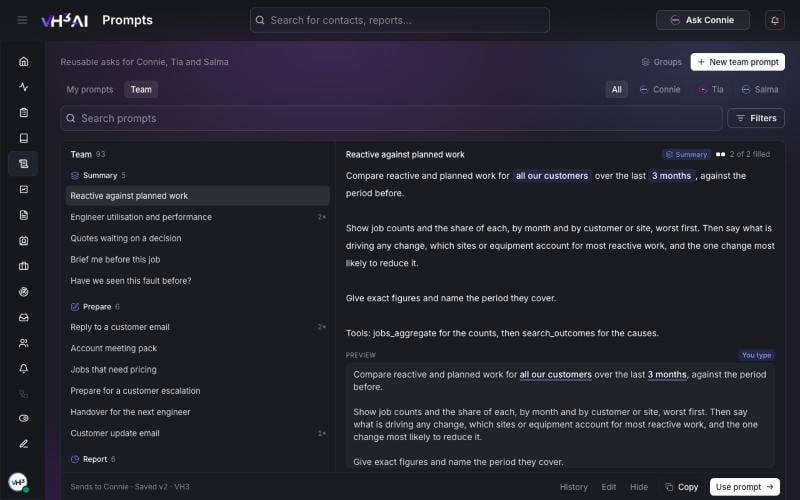
The Prompts page: groups of prompts on the left, the selected prompt and a preview on the right.
Use a prompt in a chat
- In a chat with Connie, Tia or Salma, type
/, or select + in the message box. - Open a group, such as Summary, Prepare or Investigate, or search.
- Pick a prompt. If it has blanks, fill them in.
- Send it.
Browse the Prompts page
- Select Prompts in the sidebar.
- Choose My prompts for your own, or Team for VH3 AI’s prompts and your team’s.
- Narrow the list to Connie, Tia or Salma, search, or use Filters.
- Select a prompt to see its text and a preview with your blanks filled in.
- Choose Use prompt to open the right chat with the prompt ready to send.
Add and edit prompts
- Save to prompts — under a message you sent, choose Save to prompts to keep it as your own prompt.
- New prompt — on My prompts, write a personal prompt.
- New team prompt — on Team, members who can edit team prompts add one for everybody.
- Edit, Copy and Hide — on Team, edit your team’s prompts, make a team copy of a VH3 AI prompt to change it, or hide one your team does not use.
- History — every edit keeps the earlier versions. Open History to see them and restore one.
Write prompts that work
- Name the output: a list, a table, three bullets for the standup, or a customer email.
- Name the period and the scope, or leave them as blanks.
- Say which figures matter, such as counts, shares or the worst sites first.